An agent that investigates a production problem needs to read AWS. It describes a VPC, lists log groups, reads a log stream. The quickest way to give it that is the AWS session already on your laptop. Every AWS SDK looks in the environment and in ~/.aws before anything else, so an agent that runs with your home directory picks up your SSO login without being asked.
For most engineers that login is a broad permission set. When you choose it on purpose, Brig prints what it means on every run:
brig: route aws: AWS as your own identity (profile demo-sandbox); the sandbox can do what you canThat line holds two problems. The agent can do everything you can, and CloudTrail cannot tell its calls from yours.
This post builds the other option. A dedicated IAM role with a narrow policy. Short-lived keys of that role, handed to the sandbox by Brig's credential broker on the host. A record that joins each AWS call to the sandbox that made it and to the developer who started it. The role is ordinary AWS configuration that your platform or security team owns. Brig assumes it and changes nothing on the AWS side.
We build Brig to put a microVM boundary around agent execution, and our engineering team runs its own agents in it. The aws route shipped in Brig v0.5.1.
The threat model
The agent reads untrusted input: log lines, tickets, repository content, web pages. Any of it can steer the agent into calls nobody asked for. This post assumes that happens. What it protects is your own AWS identity, the secrets in your accounts, and your data leaving for an account you do not own. It trusts the host: Brig keeps your credentials away from the agent, not away from malware on your laptop.
Why not assume the role yourself
You can assume a role on your laptop with aws sts assume-role and start the agent with the keys. That limits what the keys can do. It leaves the rest open:
- The agent runs as your user, so it can still read your SSO cache,
~/.aws, your other profiles and anything else in your home directory. - Keys passed in once either expire in the middle of a task or get requested for hours.
- Unless you name each session yourself, nothing in CloudTrail ties a session to one agent run.
- The agent can reach any host your laptop can.
With Brig, the agent runs in a microVM that holds none of your credentials. A broker on the host fetches 30-minute keys and refreshes them. Each sandbox gets its own session name, the broker records which sandbox received each key, and egress is denied except to the hosts you allow.
Account ids, names, addresses and keys in the outputs are AWS documentation placeholders: account 111122223333, developer [email protected], public IP 203.0.113.10, access keys ASIAEXAMPLE…. Everything else is what the commands printed.
How the aws route hands out keys
For most APIs, Brig's credential broker keeps the key on the host. The guest gets a route URL and a session token, and the broker adds the real credential to the request on its way out. We walked through that pattern in how Brig could have interrupted the Binance attack.
The aws route works differently. It gives the guest's AWS SDK temporary keys through the container credential provider, the mechanism ECS uses, and the SDK signs its own requests. Nothing in the agent's toolchain changes, and features that rely on the SDK signing, such as streaming uploads and presigned URLs, work as they do anywhere else. The keys are:
- temporary: 30 minutes by default, refreshed by the broker before they run out
- of a role you choose: the broker assumes it, so the guest never holds your own session
- attributable: the role session is named after the sandbox and carries the developer as its source identity
Brig sets AWS_CONTAINER_CREDENTIALS_FULL_URI to http://169.254.170.2/<sandbox>/r/aws and AWS_CONTAINER_AUTHORIZATION_TOKEN to a session token for the route. The runtime diverts that link-local address to the broker on the host, so the request never leaves the virtual link for a network. The broker runs the host's aws CLI to call sts:AssumeRole, keeps the keys in memory and answers the SDK with them.
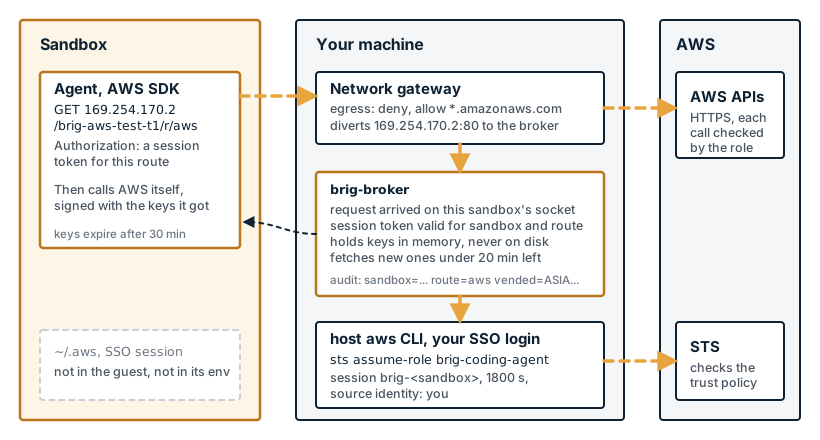
What the guest never holds: your SSO session, your ~/.aws, a long-lived key, or anything the broker uses to fetch keys. Brig refuses a run that would hand the guest AWS_ACCESS_KEY_ID, AWS_PROFILE, another credential variable or a host ~/.aws, because an SDK reads those before the container credential provider and they would silently win over the route (the aws route).
Start from the role, not from Brig
Brig's egress policy decides which hosts the sandbox can reach. It does not decide which AWS actions the agent can take. An allow rule for *.amazonaws.com lets the guest make every call the keys allow, writes included, against resources in any account (the aws preset). The role's policy is the boundary, so design it first.
Design it assuming the agent will eventually try everything the role allows. An agent acts fast and at volume, and the input that steers it is not yours.
What follows is one suggested way to define a role that coding agents can use. Brig does not ship or require any of it, so adapt it to your own accounts. Whatever the details, the role should have:
- An allow policy sized to the task. Grant what the agent needs to answer its questions, usually metadata, metrics and logs, and no writes.
- Explicit denies on reads that return secrets. Parameter and secret values, environment variables, decryption, and the buckets that hold Terraform state, failing closed when no bucket is named.
- A trust policy that admits only the broker's caller. Your developers' Identity Center sessions of a named permission set, a session name that starts with
brig-, and a required source identity. - Short sessions. Brig asks for 30 minutes. The role cannot enforce a length, so this one is on the caller.
If your audit needs AWS to verify which developer a session acts for, add the two Identity Center settings under verified attribution. The sections below take each property in turn, with the policies from one sandbox account as the example.
Decide what the agent needs to answer
Most investigation work asks what exists, how it is configured and what it is doing: metadata, metrics and logs. It rarely needs what is inside a table or a bucket. Writes are a separate decision. If an agent needs one, give it a separate, narrow role for that class of action, and never reuse the investigation role.
AWS managed policies give a starting point, ordered from least to most data exposure:
| Policy | What it allows | Use for |
|---|---|---|
SecurityAudit | Security configuration metadata | Posture and compliance agents |
ViewOnlyAccess | List and describe across services, few data reads | Investigation agents in production |
ReadOnlyAccess | Also reads data: objects, items, parameters, environment variables | A sandbox account, and only with a deny layer |
| A policy you write | Exactly the actions the task needs | Where production should end up |
AWS changes managed policies over time. Check what one grants today before you rely on it.
Read-only is not safe for an agent
The example role is for a sandbox account and starts from ReadOnlyAccess. That policy reads SSM parameter values, Secrets Manager values, Lambda environment variables and every S3 object, Terraform state included. Terraform state holds database passwords in plain text.
So the role adds explicit denies. An explicit deny wins over every allow, including access granted by a bucket policy or a KMS key policy. The inline DenySecretReads statement covers 37 actions that return secret material outside S3. An excerpt of the deployed policy:
{
  "Sid": "DenySecretReads",
  "Effect": "Deny",
  "Resource": "*",
  "Action": [
    "ssm:GetParameter", "ssm:GetParameters", "ssm:GetParametersByPath",
    "secretsmanager:GetSecretValue", "secretsmanager:BatchGetSecretValue",
    "kms:Decrypt",
    "lambda:GetFunction", "lambda:GetFunctionConfiguration",
    "ecs:DescribeTaskDefinition", "ec2:DescribeInstanceAttribute",
    "dynamodb:GetItem", "dynamodb:Query", "dynamodb:Scan",
    "sqs:ReceiveMessage", "kinesis:GetRecords", "athena:GetQueryResults",
    "codecommit:GetFile", "ecr:BatchGetImage", "cloudformation:GetTemplate"
  ]
}
S3 gets its own statement. When the stack names its state buckets, the role denies s3:GetObject* on their objects. When it names none, the role denies s3:* on everything. A stack that forgets its state bucket fails closed, not open.
The example leaves two things allowed. CloudWatch Logs reads, because reading logs is most of what the agent is for, and logs can still contain secrets. And a few list and status calls that return the same fields as a denied call, such as lambda:ListFunctions. Denying those would hide basic inventory, and IAM cannot redact one field from a response.
A deny list lags new AWS actions. Every new read that returns data is allowed until someone adds it. Use it as a second layer under a narrow allow policy, not as the only one.
Narrow who can start the agent's session
The trust policy decides who can mint keys for the agent. The example trusts the developers' IAM Identity Center sessions of one permission set, and requires a session name that starts with brig-. A trust policy cannot wildcard a principal ARN, and Identity Center gives each permission set's role a random 16-character suffix. So the policy trusts the account and narrows it with aws:PrincipalArn, matching the suffix with exactly 16 ?. DeveloperAccess then does not also match DeveloperAccess_Legacy.
It takes two statements. STS authorizes sts:SetSourceIdentity separately from sts:AssumeRole, and the request context of SetSourceIdentity has no sts:RoleSessionName. A single statement that grants both actions with a session-name condition refuses every assume that carries a source identity, with not authorized to perform: sts:SetSourceIdentity. Splitting them works, as long as AssumeRole still checks sts:SourceIdentity. Without that check, a caller that sends no source identity never needs SetSourceIdentity and gets in anyway.
{
  "Sid": "BrigBrokerMayAssume",
  "Effect": "Allow",
  "Principal": { "AWS": "arn:aws:iam::111122223333:root" },
  "Action": "sts:AssumeRole",
  "Condition": {
    "StringLike": {
      "sts:RoleSessionName": "brig-*",
      "sts:SourceIdentity": "*"
    },
    "ArnLike": {
      "aws:PrincipalArn": "arn:aws:iam::111122223333:role/aws-reserved/sso.amazonaws.com/*AWSReservedSSO_DeveloperAccess_????????????????"
    }
  }
},
{
  "Sid": "BrigBrokerMaySetSourceIdentity",
  "Effect": "Allow",
  "Principal": { "AWS": "arn:aws:iam::111122223333:root" },
  "Action": "sts:SetSourceIdentity",
  "Condition": {
    "StringLike": { "sts:SourceIdentity": "*" },
    "ArnLike": {
      "aws:PrincipalArn": "arn:aws:iam::111122223333:role/aws-reserved/sso.amazonaws.com/*AWSReservedSSO_DeveloperAccess_????????????????"
    }
  }
}
The source identity sticks to the session and to any role the session chains into, so the agent cannot drop it.
Verified attribution, if you need it
With "*", the source identity is whatever the caller sends, and the identity AWS verified is the caller in the AssumeRole event. That is enough to trace a call to a developer's session. If your audit needs AWS to check the name itself, it takes two settings in IAM Identity Center and the trust policy. Nothing changes in Brig.
-
Bind the source identity to an attribute. Enable an attribute for access control in Identity Center, such as
email, and in both trust statements replace the"*"condition with:"StringEquals": { "sts:SourceIdentity": "${aws:PrincipalTag/email}" }A caller can then no longer name someone else. Brig sends the last part of the caller's ARN, which for an SSO login is the user name, so bind an attribute that holds the same value, or set
--source-identityat import. -
Trust a dedicated permission set. Create one that grants only
sts:AssumeRoleandsts:SetSourceIdentityon the agent role, and trust only that one. Developers import the secret with the AWS profile for it. The session that brokers can then do nothing else, and developers' everyday sessions no longer qualify.
The example in this post uses neither, so the outputs below show the simpler setup.
Keep the session short
The broker assumes the role from an SSO session. That is role chaining, and STS caps a chained session at one hour whatever the role's MaxSessionDuration says. Brig asks for 30 minutes, and --session-duration sets anything from 25 minutes to an hour. IAM has no condition key on session length, so the role cannot enforce a shorter one. The caller has to ask for it, and Brig does.
A short session bounds how long a leaked key works. The broker replaces the keys it holds when they have less than 20 minutes left, so the SDK gets fresh keys well before the old ones run out.
Wire the role into Brig
With the role deployed, the Brig side is a profile, a policy and one import.
Install
On Apple Silicon with macOS 15 or newer (the guide to sandboxing your AI coding agent covers Linux and the rest of the setup):
brew tap brig-sh/brig
brew trust brig-sh/brig
brew install --cask brig
The broker uses the first aws on its PATH, so the host also needs the AWS CLI v2 and a profile you can log in with: aws sso login --profile demo-sandbox. The profile needs a region, which the guest receives as AWS_REGION.
The profile and the policy
The profile declares a secret whose source is aws. That secret holds a pointer to a host AWS profile, never keys:
name: aws-test
binary: claude
image: ghcr.io/brig-sh/claude-code-stock:root
hypervisor: hvi
guestHome: /root
secrets:
  - name: aws-test-creds
    sources:
      - from: aws
policy: [aws-test]
mem: 2048
cpus: 2
genericBoot: true
The policy denies egress by default, allows the AWS endpoints and attaches the aws preset to the secret:
apiVersion: brig.sh/v1alpha1
kind: Policy
metadata:
  name: aws-test
spec:
  egress:
    default: deny
    allow:
      - host: "*.amazonaws.com"
  routes:
    - name: aws
      preset: aws
      credential:
        secretRef: { name: aws-test-creds }
The route needs no allow rule for 169.254.170.2. The runtime diverts that address to the broker, and the rest of 169.254.0.0/16 stays refused.
brig policy check aws-test says where the route can be enforced (excerpt). It is enforced on hull with the hvi backend and on Linux with nerdctl and urunc, which give the sandbox a network of its own:
aws-test
  route aws  preset aws  mode endpoint
    hull on hvi  enforced: ...
    hull on vz  cannot enforce: ...
    nerdctl on io.containerd.urunc.v2  enforced: ...
    docker  cannot enforce: ...
posture: isolated
note: enforced on the hvi backend and on Linux with nerdctl, which give the sandbox a network of its own; a run on any other backend is refused rather than left unenforced
A run on a backend that cannot enforce it is refused, not booted without it.
Import the secret in role mode
$ brig secret import aws-test --aws-profile demo-sandbox \
    --role-arn arn:aws:iam::111122223333:role/brig-coding-agent -y
aws-test: importing 1 secret
  aws-test-creds: replaced from aws:demo-sandbox
Before it stores anything, import asks aws who the profile is, reads its region, and in role mode assumes the role once and throws the keys away. A role the profile cannot assume fails here, not at the first run. Then it stores the pointer: the profile, the mode, the role and the source identity, which it reads from your SSO user name. --dry-run runs the same checks and stores nothing (an AWS profile behind a route).
aws runs with every AWS_ variable removed, at import and in the broker. An AWS_PROFILE left in your shell does not decide which identity a sandbox gets.
import refuses a line that names neither --role-arn nor --identity self, or both. Self mode, the banner at the top of this post, has to be asked for by name. It is never what a missing flag falls back to.
Run it
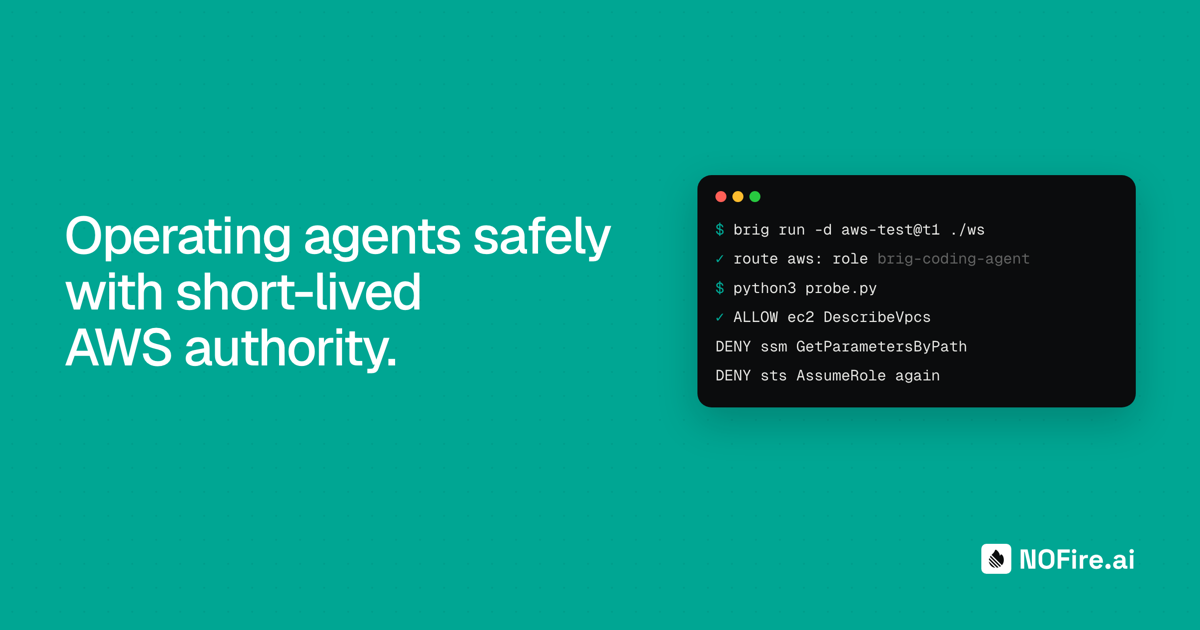
$ brig run -d aws-test@t1 ./ws
brig: route aws: AWS role arn:aws:iam::111122223333:role/brig-coding-agent, assumed from your profile demo-sandbox
brig-aws-test-t1
Before the guest boots, the broker assumes the role for this sandbox. A run that cannot get AWS credentials, because the SSO login lapsed, is refused at start with the command that fixes it.
brig info aws-test@t1 shows what the sandbox is bound to. The only credential-shaped thing in the guest is a session token for the route, and the secret is kept on the host:
CREDENTIALS  AWS_CONTAINER_AUTHORIZATION_TOKEN(route: aws)
NETWORK      isolated (a network of this sandbox's own)
POLICY       aws-test (egress default: deny)
BROKER       transport brig.internal and 169.254.170.2:80, routes aws; ... kept on the host: aws-test-creds; modes endpoint
What the guest holds
Inside the guest, the AWS environment is four variables and nothing on disk:
AWS_CONTAINER_AUTHORIZATION_TOKEN=<redacted>
AWS_CONTAINER_CREDENTIALS_FULL_URI=http://169.254.170.2/brig-aws-test-t1/r/aws
AWS_REGION=us-east-1
AWS_DEFAULT_REGION=us-east-1
vend (right token):  AccessKeyId: ASIA…  fields: AccessKeyId,SecretAccessKey,Token,Expiration
vend (wrong token):  401
other path:          404
https://github.com:  blocked (egress default deny)
/root/.aws:          does not exist
The guest holds no key the broker uses, so it cannot mint a session token. Each token is an HMAC under a key derived for that one sandbox, bound to the sandbox and the route, and it expires. The broker identifies the sandbox by the socket the request arrived on, not by anything in the request. A path that names another sandbox is refused with a 404 before the token is read (session tokens).
Probe the role from inside the sandbox
A short boto3 script, run in the guest with brig exec, tries what an agent might try:
View the probe script
# Run inside the sandbox: brig -q exec aws-test@t1 -- sh -c 'PYTHONPATH=$(pwd)/py python3 probe.py'
# boto3 was installed into the shared workspace with: python3 -m pip install --target ws/py boto3
import boto3, botocore
def t(name, f):
    try:
        print(f"ALLOW {name}: {f()}")
    except botocore.exceptions.ClientError as e:
        print(f"DENY  {name}: {e.response['Error']['Code']}")
print("whoami:", boto3.client("sts").get_caller_identity()["Arn"])
s3=boto3.client("s3"); ssm=boto3.client("ssm"); sm=boto3.client("secretsmanager"); ec2=boto3.client("ec2"); logs=boto3.client("logs")
t("ec2 DescribeVpcs", lambda: len(ec2.describe_vpcs()["Vpcs"]))
t("logs DescribeLogGroups", lambda: len(logs.describe_log_groups(limit=5)["logGroups"]))
t("s3 ListBuckets", lambda: len(s3.list_buckets()["Buckets"]))
t("s3 GetObject state bucket", lambda: s3.get_object(Bucket="example-terraform-state", Key="sandbox/brig-coding-agent/terraform.tfstate")["ContentLength"])
t("ssm GetParametersByPath", lambda: len(ssm.get_parameters_by_path(Path="/", MaxResults=1)["Parameters"]))
t("secretsmanager GetSecretValue", lambda: sm.get_secret_value(SecretId="brig-probe-nonexistent"))
vpc=ec2.describe_vpcs()["Vpcs"][0]["VpcId"]
t("ec2 CreateTags (DryRun)", lambda: ec2.create_tags(DryRun=True, Resources=[vpc], Tags=[{"Key":"brig-probe","Value":"x"}]))
t("sts AssumeRole again, session 'evil'", lambda: boto3.client("sts").assume_role(RoleArn="arn:aws:iam::111122223333:role/brig-coding-agent", RoleSessionName="evil")["AssumedRoleUser"]["Arn"])
t("sts AssumeRole again, session 'brig-evil'", lambda: boto3.client("sts").assume_role(RoleArn="arn:aws:iam::111122223333:role/brig-coding-agent", RoleSessionName="brig-evil")["AssumedRoleUser"]["Arn"])
The output:
whoami: arn:aws:sts::111122223333:assumed-role/brig-coding-agent/brig-aws-test-t1
ALLOW ec2 DescribeVpcs: 1
ALLOW logs DescribeLogGroups: 0
ALLOW s3 ListBuckets: 33
DENY  s3 GetObject state bucket: AccessDenied
DENY  ssm GetParametersByPath: AccessDeniedException
DENY  secretsmanager GetSecretValue: AccessDeniedException
DENY  ec2 CreateTags (DryRun): UnauthorizedOperation
DENY  sts AssumeRole again, session 'evil': AccessDenied
DENY sts AssumeRole again, session 'brig-evil': AccessDenied| Call | Result | Refused by |
|---|---|---|
ec2 DescribeVpcs, logs DescribeLogGroups, s3 ListBuckets | allowed | ReadOnlyAccess grants them |
s3 GetObject on the Terraform state bucket | denied | the S3 object deny |
ssm GetParametersByPath, secretsmanager GetSecretValue | denied | DenySecretReads |
ec2 CreateTags with DryRun | denied | ReadOnlyAccess grants no write |
sts AssumeRole of the same role, session brig-evil | denied | the trust policy: the caller is not an Identity Center session |
The last row matters. A session name that matches brig-* is not enough to mint keys. The agent's own keys cannot assume the role again and reset the clock or drop the source identity.
The Secrets Manager probe asks for a secret that does not exist. AccessDenied instead of ResourceNotFoundException shows IAM refused the call before the service looked.
One key, three records
The access key id is the join key. CloudTrail records it when STS issues it and on every call made with it. Brig's broker records which sandbox received it.
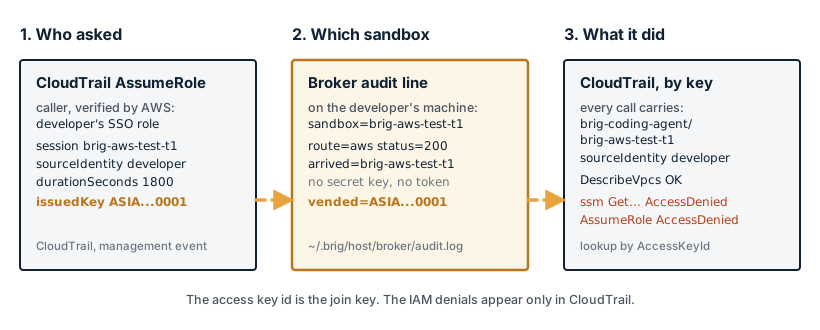
1. CloudTrail: who asked for the session
The AssumeRole event names the caller AWS verified, the developer's Identity Center session, and the session Brig requested:
2026-11-03T11:48:14Z OK | caller= arn:aws:sts::111122223333:assumed-role/AWSReservedSSO_DeveloperAccess_0123456789abcdef/[email protected] | role= arn:aws:iam::111122223333:role/brig-coding-agent | session= brig-aws-test-t1 | sourceIdentity= [email protected] | durationSeconds= 1800 | issuedKey= ASIAEXAMPLE0000000012. The broker: which sandbox received the key
The broker writes one audit line per request, to ~/.brig/host/broker/audit.log on the developer's machine. For a route that vends, vended= names the access key id it answered with:
time=2026-11-03T13:48:32.657+02:00 level=INFO msg=broker workload=spiffe://brig.local/brig/profile/aws-test/session/t1 sandbox=brig-aws-test-t1 route=aws method=GET path=/ status=200 dur=25.281458ms arrived=brig-aws-test-t1 vended=ASIAEXAMPLE000000001The line never holds the secret key or the session token. Refusals are logged too, with the check that refused them:
msg=broker method=GET status=401 dur=14.916µs check=token arrived=brig-aws-test-t1
msg=broker ... sandbox=brig-aws-test-t1 route=aws method=GET path=/x status=404 dur=25.791µs check=path arrived=brig-aws-test-t1
A request with a token the broker could not verify gets only the method, the status, the check and the arrival sandbox in the log. Nothing it wrote into the path is trusted enough to record.
3. CloudTrail: what the key did
Every call made with the key carries the role session and the source identity, denials included:
2026-11-03T11:49:04Z sts AssumeRole AccessDenied | arn:aws:sts::111122223333:assumed-role/brig-coding-agent/brig-aws-test-t1 | sourceIdentity= [email protected]
2026-11-03T11:49:03Z ec2 CreateTags Client.UnauthorizedOperation | ...
2026-11-03T11:48:39Z secretsmanager GetSecretValue AccessDenied | ...
2026-11-03T11:48:38Z ssm GetParametersByPath AccessDenied | ...
2026-11-03T11:48:36Z s3 ListBuckets OK | ...
2026-11-03T11:48:35Z logs DescribeLogGroups OK | ...
2026-11-03T11:48:34Z ec2 DescribeVpcs OK | ...
2026-11-03T11:48:33Z sts GetCallerIdentity OK | ...
Following a key in your SIEM
In a team, these records belong in the SIEM you already run, with CloudTrail from every agent account and the broker audit logs collected beside it. The join is one field: userIdentity.accessKeyId on each call, responseElements.credentials.accessKeyId on the AssumeRole that issued it, and vended= in the broker line. Starting from a suspicious event:
- Take the access key id from the event. The session name in its ARN already names the sandbox.
- Find the
AssumeRoleevent that issued the key, for the verified caller, the time and the source IP. - Find the broker line with
vended=<key>, which confirms the sandbox that received it and the profile and session it ran under. - Find every other call made with the key.
Without a SIEM, aws cloudtrail lookup-events does the same lookups by AccessKeyId and by EventName=AssumeRole, which is how the outputs above were pulled. It covers 90 days of management events in one region.
Two things CloudTrail does not show by default. The denied s3 GetObject is missing from the list above: S3 object reads are data events, and CloudTrail records them only on a trail with data events turned on. And every event, the AssumeRole included, has the laptop's public IP as its source, because the sandbox's traffic leaves through the host. The IP cannot tell the sandbox's calls from the developer's.
The IAM denials appear only in CloudTrail. The guest calls AWS directly, so the broker sees the key fetch and not what the key was used for. Each log answers a different question, and the access key id connects them.
Weigh the two sources differently. The session name in CloudTrail already ties each call to a sandbox, and CloudTrail is written by AWS. The broker log corroborates it, but it lives on a machine the developer controls until it is collected. Treat CloudTrail as the record and the broker log as supporting evidence.
Limitations
The trail proves attribution: which developer's broker asked for a session, for which sandbox, and what that session did. It does not prove origin.
| Verified by | What |
|---|---|
| The broker, on the host | The request arrived on this sandbox's own socket. The token is valid for this sandbox and route. The role, the mode and the source identity come from the stored pointer, never from the request. |
| AWS | The caller is an Identity Center session of the trusted permission set. The session name matches brig-*. Every call is checked against the role's policies. |
| Nobody | That an API call came from inside a sandbox. That the keys stayed there. |
The vended keys are bearer credentials. They work anywhere AWS answers, outside the sandbox too, until they expire. Between the VM and the host they cross the virtual link in clear text, because the AWS SDKs accept plain HTTP to a container credential URL only on loopback and a few link-local addresses (transports). They never cross a network.
brig stop revokes the sandbox's session tokens, so it can fetch no more keys. Keys it already holds stay valid until they expire.
With the example trust policy, the source identity is whatever the caller sends, and the verified identity is the caller in the AssumeRole event. Anyone who holds a session of the trusted permission set can request a session with the same name and source identity. The two settings under verified attribution close that in AWS.
And Brig does not inspect the image. An AWS_* variable baked into the image wins over the route.
What to alert on
Nobody can prove the keys stayed in the sandbox, but a few signals show when something is off. Each one uses fields CloudTrail already carries, so it can be a rule in your SIEM. The exact query depends on the SIEM.
| Signal | What it suggests | ATT&CK |
|---|---|---|
A call made with an agent key from a source IP other than the one on the AssumeRole that issued it | The key is in use outside the developer's machine. Laptops change networks, so treat it as a signal to check, not proof | T1078.004 |
AccessDenied on secret reads (ssm:GetParameter*, secretsmanager:GetSecretValue, kms:Decrypt) from assumed-role/brig-coding-agent/brig-* | The agent went looking for credentials. Several in a row is probing, or the agent being steered | T1555.006 |
sts:AssumeRole made by an agent session | The role never needs it. It is an attempt to chain into another role or reset the session | T1078.004 |
s3:GetObject on a Terraform state bucket from an agent session, allowed or denied | Someone tried to read stored secrets. Needs S3 data events on the trail | T1530 |
Tighten it for production
Everything in this section is AWS configuration your team owns. Treat the policies as sketches, and run them through IAM Access Analyzer and the policy simulator before you use them.
- Replace the deny list with an allow list. Write a policy with the services and actions the agent uses, keep the denies as a second layer, and add a permissions boundary so a later change cannot widen the role. IAM Access Analyzer can generate a first version from the role's CloudTrail activity in a sandbox account. An SCP on the agent accounts holds even when an account admin edits the role.
- Treat other accounts as an exfiltration path.
*.amazonaws.comreaches every AWS account, not only yours. A steered agent with a read-only role can calls3:GetObjecton a bucket an attacker owns and carry data out in the object key, because the bucket owner can log every request. The vended keys can leave the same way. Two controls narrow it. Deny requests whoseaws:ResourceAccountis not one of your accounts, in the role or in an SCP, which is the resource side of an AWS data perimeter. And replace*.amazonaws.comin the Brig egress policy with the service endpoints the agent uses. The deny stops the call from succeeding, but the request can still reach the other account and show in its logs. If the agent does not need S3, leaving S3 out of the egress list removes that channel. - Record data events. Turn on S3 and Lambda data events for sessions of the agent role, so the reads the deny list exists for show up in the SIEM.
If a key leaks, stop the new fetches first, because AWS can only revoke sessions issued before a time. Run brig stop for each sandbox on the route and brig secret delete for the secret. Then use Revoke active sessions on the role in IAM, which attaches a deny for sessions issued before now. Follow the vended key in your SIEM, or in CloudTrail, to see what it did.
The platform team owns the role
The developer's part of this is one import and one run. The rest is a role, a trust policy and a Brig policy, and those belong to the team that owns the AWS accounts. Keep them in a repository, review changes to them, and distribute the Brig profile and policy with the role they point at.
The broker's audit log lives on each developer's machine. For a team, it needs to be collected off that machine and into the SIEM next to CloudTrail. Our enterprise offering around Brig adds that: host-side observation, centralized action records and SIEM export through OpenTelemetry and OCSF, in private beta. The enterprise agent security page lists what is available.
Brig is open source under Apache 2.0. Give the agent a role, read the trail it leaves, and try to make it do more than the role allows. For fleet policy and SIEM integration, talk to us about your deployment.